AI coding tutorial video — Twilight desktop style
Make an AI or coding tutorial on a fake computer desktop at sunset: terminal and code windows swinging in 3D, video cards in a fan, a walking avatar.
Termasuk dari Starter, dengan semua 81 gaya plus milikmu sendiri · pratinjau dibuat oleh mesin ClipOnIt
Tampilan gaya ini
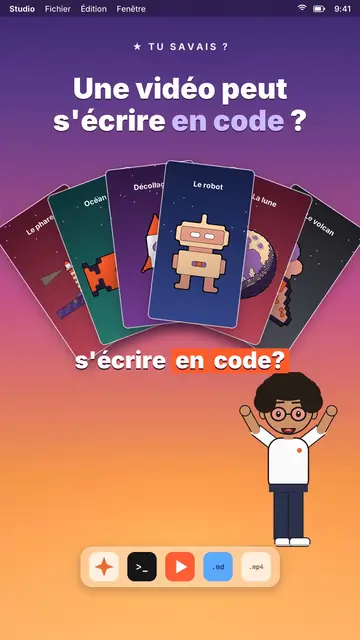
Twilight desktop recreates a computer desktop, with its menu bar at the top and its dock at the bottom, set on a violet, pink and peach sunset gradient. Dark windows swing open in 3D on the spoken word: a terminal typing its commands, a code editor, a recap window, a statistic. Vertical videos spread out in a fan or a grid, and a counter climbs to the announced number.
At the bottom of the screen, a full-body avatar walks from one side to the other and presents, points or raises an arm. The big white title at the top carries one word in lavender, under a small mono kicker (“★ did you know?”). An orange tag pops under a window to say “written by AI”. The end can release an army of avatar clones, then a “Comment” card with a field that types itself and a “Subscribed” card.
Cocok untuk topik apa
Avoid: topics far from the screen, like nature, history or sport: everything happens in a fake operating system. Also avoid emotional stories; the tone stays that of a demo.
- Coding and AI tutorialsThe terminal and the editor show the real command, line by line, as you say it.
- Tech “did you know?” clipsThe kicker and the lavender title ask the question, the swinging window gives the answer.
- Tool showcasesVideo cards in a fan show what the tool produces, without screenshots.
- Growth numbersThe counter climbing in its window makes a result concrete and measurable.
Ide video dengan gaya ini
- A video can be written in code
Video cards in a fan, the editor filling up and the “written by AI” tag.
- Automate a task in 3 commands
The terminal typing each command, the recap and the avatar giving a thumbs up.
- How many hours AI saved me
The stats window, the climbing counter and the grid of finished tasks.
- Make 100 videos from one script
The video grid filling up and the clone army at the end.
Dapatkan dalam 1 klik
- Buka tautan gaya ini
Tombol “Buat video dengan gaya ini” membuka editor dengan gaya ini sudah dipilih. Tanpa akun, mendaftar hanya butuh satu menit dan tidak perlu kartu.
- Tulis topikmu dalam satu kalimat
Satu ide sudah cukup. Kamu juga bisa menempel teks atau, mulai dari Starter, berbicara lewat mikrofon: video kemudian dibuat berdasarkan suaramu.
- Tinjau, lalu render
AI menulis adegan, memilih elemen gaya dan mengatur waktunya sesuai kata-kata, lengkap dengan suara dan keterangan. Kamu perbaiki yang kurang pas, lalu MP4 vertikal siap dalam beberapa menit.
Yang bisa kamu sesuaikan
For each scene you pick the kicker, the title and its lavender word, the window that opens on the word (terminal, code, recap, stat, video cards or a library element), the orange tag, and the avatar's side and pose. The last scene carries the word to comment.
Pertanyaan yang sering diajukan
Gratis atau tidak, hasilnya, penggunaannya: jawaban singkatnya.
Is the code shown real?
It is the text you write in the script: commands, code lines, results. The engine types it into the window; nothing is executed.
Bisakah saya memakai suara saya sendiri?
Yes. Record yourself or import your audio: windows open and the terminal types on your words.
How is it different from Clean interface?
Clean interface plays the story in light windows with a clicking cursor. Twilight desktop sets dark windows swinging in 3D over a sunset, with a walking avatar.
Apakah gaya ini termasuk paket gratis?
Tidak, ini termasuk di Starter ($29/bulan): 15 video bebas watermark sebulan, semua 81 gaya plus milikmu sendiri. Paket gratis memberi 3 video sebulan dengan watermark dalam 8 gaya lain: Pixel News, Press paper, Comedy cartoon, Class sketch, Night tale, Social screen, Retro synthwave dan Flat vector.
Jika kamu suka gaya ini

UI motion design explainer video
Clean interface style · The story played out in clean interface cards: windows, buttons, a cursor clicking on the word, key word in serif.
Glassmorphism tech video
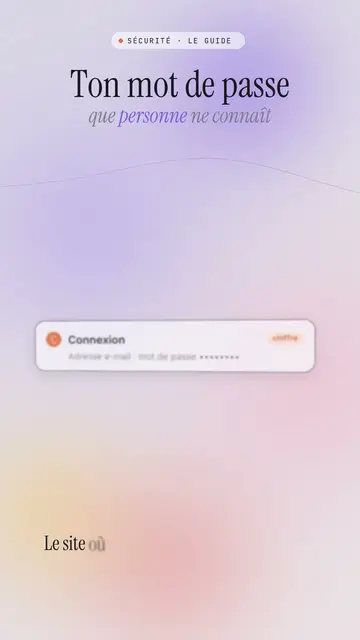
Lavender frosted glass style · Frosted glass UI cards rising and coming into focus on a lavender gradient with halos.
Content creator video
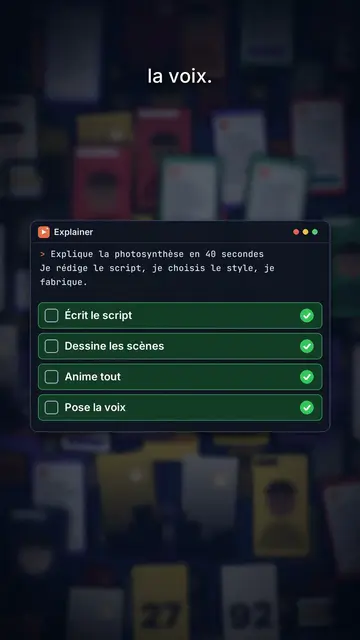
Thumbnail wall style · A midnight blue wall of video thumbnails in depth, a zoom through the wall, gold numbers.
Ide kamu, dalam gaya ini
Tulis kalimat atau ucapkan: gaya sudah dipilih saat kamu masuk ke editor.